What information is sent outside LQ.AI?
The answer depends on which services you enable and where they run. Keeping uploaded files on your own computer does not keep every use of their contents there.
Data boundary summary
Section titled “Data boundary summary”You control the computers running LQ.AI, access to the deployment, and its configuration. A cloud model can receive your question and document content; storing files locally does not keep every use of their contents local.


Documents and application records live in your environment, but LQ.AI can send content along separately configured routes. Model and tool requests go through the gateway; email and monitoring have their own enabled routes. Check the chat provider, document-search provider, research or connectors, and exports separately. Choosing local chat does not settle the other routes.
Diagram source
flowchart LR
    %% portrait-flat
    accTitle: Review every route across the data boundary
    accDescr: Documents and application records live in your environment, but LQ.AI can send content along separately configured routes. Model and tool requests go through the gateway; email and monitoring have their own enabled routes. Check the chat provider, document-search provider, research or connectors, and exports separately. Choosing local chat does not settle the other routes.
    subgraph controlled["Your environment"]
        direction TB
        workspace["LQ.AI and stored documents"]
        local["Local chat model"]
    end
    subgraph outside["External endpoints, when enabled"]
        direction TB
        cloud["Chat provider"]
        search["Embedding provider"]
        tools["Research and connectors"]
        exports["Email and monitoring"]
    end
    %% portrait-stack: workspace local cloud search tools exports
    workspace --> local
    workspace --> cloud
    workspace --> search
    workspace -.-> tools
    workspace -.-> exports
Local inference is available, but the chat model, document-search model, fallback models, and other enabled connections must each be checked. Security depends on the deployment and on which services you enable. Read the full data accounting for those connections and their limitations.
When you ask a cloud AI service
Section titled “When you ask a cloud AI service”The request can include your question, document passages, skill instructions, supporting files and search results. The uploaded file itself may stay in local storage while text extracted from it is sent to the provider.
Where a request’s content actually goes depends on the Inference Tier it routes at. The Inference
Gateway is the only component in the deployment that holds provider API keys and the only
component that makes outbound inference calls — the backend holds exactly one outbound HTTP
client, pointed at the gateway (api/app/clients/gateway.py, per
docs/HONEST-STATE.md).
- Tier 1 (local-only). Inference runs on a local endpoint the operator runs — Ollama via
docker compose --profile local upis the reference default, and README.md names vLLM, llama.cpp, or any OpenAI-compatible local endpoint as equally Tier 1. Nothing leaves the deployment for chat (document search is a separate question — see “Other connections to check” below). - Tiers 2–5 (customer-hosted, enterprise ZDR, standard cloud, consumer/free). Chat and skill content is sent to the configured provider. Whether it is pseudonymized first depends on the anonymization posture below.
Before it leaves at Tiers 3–5, chat and skill content is pseudonymized by the gateway’s
Anonymization Layer — if the operator has turned the feature on (anonymization.enabled defaults
to false in gateway.yaml.example) and the project is not marked privileged. Retrieved
knowledge-base documents are not pseudonymized at any tier, by design — the model needs intact
source text to ground citations — so a KB-attached chat sends the source document itself to
whichever tier the request is routed at, pseudonymization or not.
Other connections to check
Section titled “Other connections to check”A single request already bundles several data categories — chat history, the attached skill, its reference files, organization background and retrieved document passages — before any of the connections below even fire. Document-search models, research tools, email and monitoring can also send information out, on their own schedule and independently of which chat model you pick. Installation and document processing may download software or model files. Review each enabled service and its address — picking a local chat model does not by itself settle any of these.
- Document search (embeddings). Turning a document chunk into a vector for search sends that
chunk’s text to whichever provider backs the gateway’s
embeddingalias —openai-prod/text-embedding-3-smallby default ingateway.yaml.example— independently of the chat model’s tier. A Tier 1 chat model does not, by itself, keep document search local; repointing the alias needs a local, embedding-capable adapter that doesn’t exist yet — Ollama’s adapter explicitly raisesProviderUnsupportedErrorfor embeddings today (gateway/app/providers/ollama.py:260-284; ADR 0008). - Research tools. Skill and chat tool calls to CourtListener, GovInfo, EDGAR, EUR-Lex, or an
MCP server go through the gateway’s tool-provider proxy (
gateway/app/api/tools.py), never directly from the backend (ADR 0014). CourtListener/GovInfo/EDGAR/EUR-Lex are off until the operator uncomments and configures the matching block ingateway.yaml— or enables it at runtime via Admin → Research sources /POST /api/v1/admin/tool-providers(gateway/app/tool_provider_defaults.py), no YAML edit or restart needed — with its ownegress_tierand an exact outbound-host allowlist either way. MCP servers are configured separately, in amcp_servers:block inmcp.yaml(MCP_CONFIG_PATH, default./mcp.yaml;gateway/app/config.py:227-229, templatemcp.yaml.example), not ingateway.yaml. - Email. The autonomous layer sends a best-effort SMTP copy of an in-app notification only
when
smtp_hostis configured (api/app/config.py); it is unset by default, so a fresh install sends no email. - Monitoring. OpenTelemetry traces go to the operator’s own configured endpoint only if
OTEL_EXPORTER_OTLP_ENDPOINTis set — unset by default, so no traces leave (api/app/observability.py,gateway/app/observability.py). Prometheus’s/metricsis scraped by the operator’s own monitoring, not pushed out by LQ.AI. The audit log itself has no first-class streaming or export path as of this commit — the PRD names SIEM streaming via syslog or webhook as a future capability, but the shipped path is an operator-runpg_dump --table=audit_logagainst their own Postgres (docs/security/audit-logging.md). - Downloads. Installation downloads application dependencies and container images. For PDFs,
PyMuPDF produces the canonical text; the optional Docling pass, controlled by
lq_ai_docling_enabled, can also attempt to load model files (api/app/pipeline/parsers.py). Text/Markdown uploads follow a separate direct-text parser, so uploading any first document is not a universal model-download trigger. Review the enabled parser and its caches before using an isolated network — see Use AI without an internet connection. Pulling local model weights is a separate, operator-run step.
Where API keys are handled
Section titled “Where API keys are handled”When you save a provider key through the app (Admin → Provider keys), it passes through the
API to the gateway (api/app/api/admin.py), which Fernet-encrypts it, persists it into
gateway.yaml, and hot-applies the rebuilt adapter with no gateway restart
(gateway/app/provider_keys.py, apply_provider_key). The gateway still has to send
the key to the provider itself when it makes a request on your behalf. A key saved this way is
encrypted at rest, but other copies — a .env file next to your compose file, a secrets manager, a
container’s environment, or a backup of the gateway-config volume — aren’t touched by saving
through the app and need their own handling. See
Replace a leaked API key and
Encrypted keys for what those copies are and how to rotate all of them.
What the five tier labels mean
Section titled “What the five tier labels mean”The project labels routes from Tier 1 through Tier 5: local-only inference; customer-hosted cloud
inference; enterprise managed inference with ZDR / no-training commitments; a standard cloud API
under default commercial terms; and consumer or free-tier access. Lower numbers mean a stronger
intended privacy posture. These are routing classifications the operator declares per provider in
gateway.yaml — the gateway enforces the classification, it does not verify a provider’s actual
contract, account plan, or hosting region. Confirm the endpoint, hosting arrangement and terms
behind the label yourself with your provider — the codebase only shows you what tier was declared,
not what the account terms actually are.
LQ.AI in action
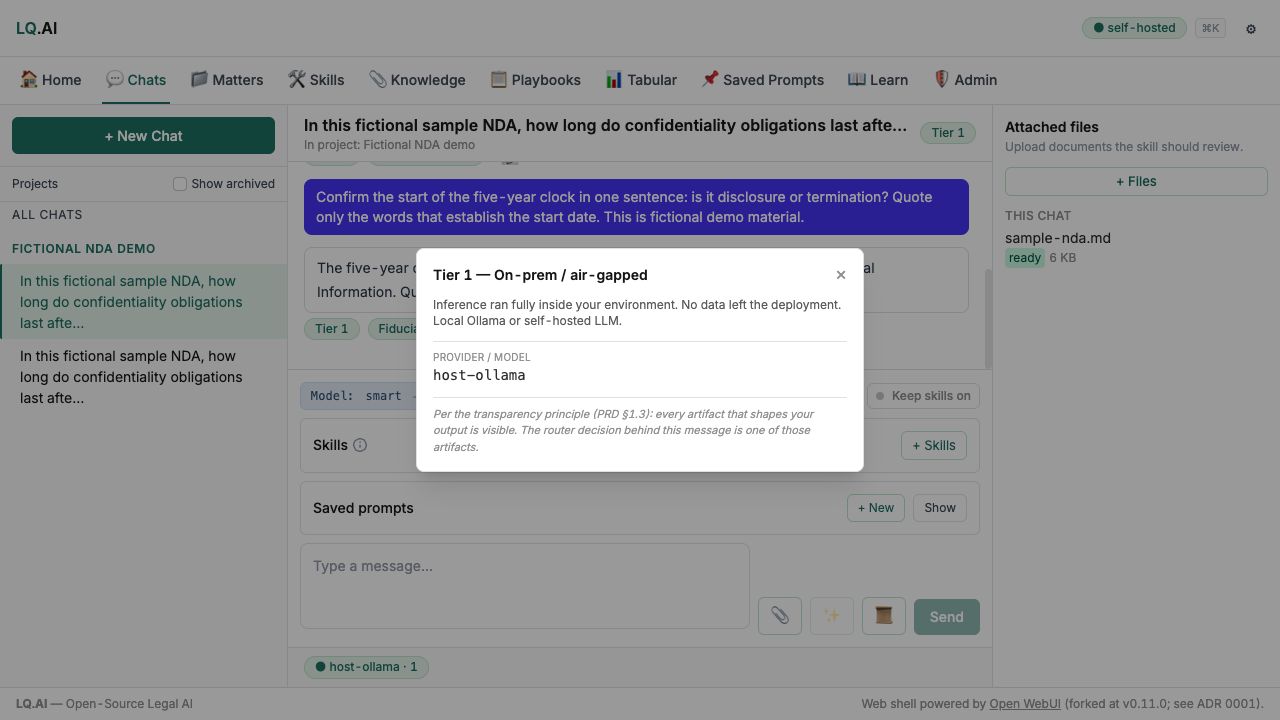
These examples use fictional material. AI answers require review; each caption identifies the workflow shown.
Privileged matters and fallbacks
Section titled “Privileged matters and fallbacks”The app can restrict routing for a matter or skill and reject routes that do not meet that
requirement: privileged projects skip the Anonymization Layer entirely — rewriting privileged work
product risks corrupting it — and are expected to pair with a tier floor of 1 (local-only). The
gateway enforces that floor server-side: a request that tries to route a privileged project below
its floor is refused with tier_below_minimum, not silently downgraded. That refusal check runs
against the primary candidate model only — if the primary fails and the request falls through to
a configured fallback, the fallback’s own tier is not independently re-checked against the floor
(gateway/app/api/inference.py), so check your fallback model choices as well as the preferred one.
Privileged requests skip the identifying-detail replacement path, so do not assume the privilege
label alone means text has been scrubbed before sending.
Given the unmeasured false-negative rate named above, route privileged matters to Tier 1. That is the only path today where the “what leaves my deployment” question has a structural answer rather than a configured one — local inference means the destination question does not arise. For non-privileged work at Tiers 3–5, treat the Anonymization Layer as a mitigation with an unmeasured false-negative rate, not a guarantee, and weigh that against the sensitivity of what you are sending.
- Anonymization — the full recognizer set, what is validated, what is not.
- Threat model — the STRIDE coverage for every production service.
- Verify these claims yourself — how to check the tier-floor enforcement in source.